How Do I Track My EKR Order?
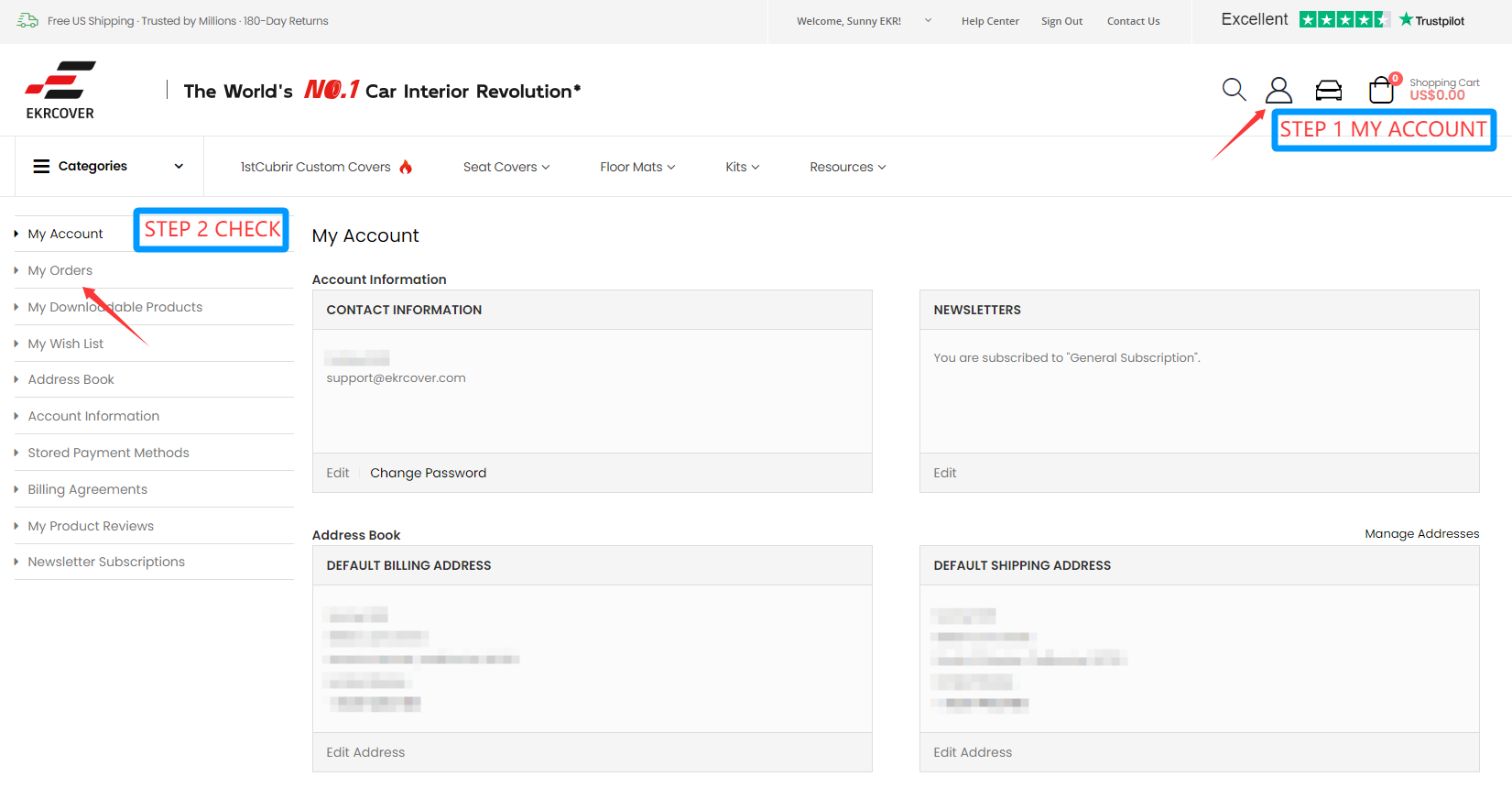
To track an EKR order, sign in to your EKR account and open My Orders. Select the order you want to review to see its current status and any available shipping information. Once an order is dispatched, tracking information is also sent to the email address used for the order.
If you placed your order before creating an EKR account, the earlier order may not automatically appear in the newly created account. In that case, contact EKR Support using the contact information associated with your order.
Track Your Order Through Your EKR Account
If you placed your order while signed in to your EKR account, My Orders is the easiest place to review your order information.
Sign In to Your EKR Account
Visit My Account and sign in with the email address associated with your account.
Open My Orders
From your customer account, open the My Orders section to review orders associated with that account.
Select View Order
Find the order you want to check and open its order details.
Review the Current Status
The order details page can show the current store status and, when available, shipping or tracking information.
Track Your Shipment From the Shipping Confirmation Email
Once an order has been dispatched, EKR sends shipping confirmation and tracking information to the email address associated with the order.
Use the tracking number or carrier link in that message to view the latest shipment activity on the carrier's tracking system.
Carriers can vary depending on destination, order details, and fulfillment method.
What Does My EKR Order Status Mean?
Store order status and carrier tracking status are related, but they are not the same thing. The descriptions below explain what each store status generally means.
| Status | What It Usually Means | What You Should Do |
|---|---|---|
| Pending | The order or payment is still being processed and has not yet moved into the next fulfillment stage. | Check the status again later. If it remains unchanged or you believe payment was completed, contact EKR Support. |
| Processing | The order has entered EKR's review, preparation, or production workflow. | No action is usually required unless EKR contacts you for additional vehicle or order information. |
| Complete / Completed | The order has reached a completed fulfillment stage in the store system. | If tracking information is available, use the carrier link to view the latest shipping progress. |
| Canceled | The order did not continue through the normal fulfillment process. | Review your order and payment information. Contact EKR Support if you need clarification before placing another order. |
Order Status Is Not the Same as Carrier Tracking
Your EKR account shows the order's status inside the store system. After shipment, the carrier's tracking page provides the most current transportation updates.
For example, an order may already have a shipping label or tracking number while the carrier is still waiting for its first physical scan.
Once tracking is available, use the carrier information in your shipping confirmation for the latest package movement.
Why Hasn't My Tracking Updated Yet?
A tracking number does not always mean that a package will immediately show new carrier scans.
Label Created
A shipping label may be created before the carrier performs its first physical scan.
Carrier Scan Delay
Packages can sometimes move between facilities before a new public tracking event appears online.
Weekend or Holiday Timing
Carrier processing and tracking updates can be affected by weekends, holidays, or peak shipping periods.
Weather or Logistics Delays
Severe weather, transportation disruptions, or other carrier conditions can affect package movement.
Cross-Border Movement
Some custom-made products may move through international fulfillment before reaching the destination country. Tracking events may vary during different stages of that process.
Tracking Has Stopped for an Extended Period
If tracking remains unchanged longer than expected, contact EKR Support with your order number so the team can review the situation.
Custom-Made and Prepared Orders May Follow Different Timelines
Not every EKR product follows exactly the same preparation and shipping process.
Custom-Made Products
Many EKR products are produced after purchase according to the selected vehicle, configuration, material, and style. Production therefore occurs before shipment.
Prepared / Locally Available Products
Some styles or vehicle configurations may already be prepared and available through local fulfillment locations, which can shorten the preparation stage.
Check the Current Shipping Policy for Delivery Expectations
Delivery timing can vary by product type, customization requirements, fulfillment location, and destination.
For the latest delivery information, review the EKR Shipping Policy rather than relying on older production or transit estimates.
What If My Order Does Not Appear in My Account?
If you completed your purchase before creating an EKR account, that earlier order may not automatically appear in the account you create afterward.
If this happens, do not place a duplicate order simply because the original one is not visible under My Orders.
Contact EKR Support and provide information that can help identify the order, such as your order number and the email address used at checkout.
What If Product Availability Changes After I Order?
Product availability can change during fulfillment, particularly when products are managed across different inventory and fulfillment locations.
Don't Assume the Order Was Canceled
A change in website availability does not automatically tell you what has happened to an existing order. Check your actual order status or contact EKR Support.
Watch for Order Communication
If an availability issue affects fulfillment, review any communication associated with your order for the next available steps.
Ask About Available Options
Depending on the specific order, support can review what options are currently available for the affected item.
Avoid Relying on a Fixed Restock Date
Restock timing can differ by product, vehicle configuration, material, and supply situation. Contact EKR for information about the specific item in your order.
Have This Information Ready Before Contacting EKR
Providing the basic order details can make it easier for the support team to locate and review your order.
Order Number
Include the EKR order number shown in your order confirmation when available.
Checkout Email
Use the same email address associated with the original order.
Current Order Status
Let support know what status appears in My Orders, if the order is visible there.
Tracking Number
If the order has shipped, include the tracking number and describe what you are seeing on the carrier's tracking page.
EKR Order Tracking FAQs
How do I track my EKR order?
Sign in to your EKR account, open My Orders, and select the order you want to review. Once the order has shipped, tracking information is also sent to the email address associated with the order.
Where can I find my tracking number?
Once your order is dispatched, tracking information is sent by email. Tracking information may also appear with the order details when available.
Why does my tracking number show no movement?
A label may be created before the carrier's first physical scan. Carrier updates can also be delayed during transportation, weekends, holidays, weather events, or other logistics conditions.
Why is my order still Processing?
Processing can include order review, preparation, vehicle matching, or production, depending on the product. Many EKR products are custom-made, so shipment does not necessarily occur immediately after purchase.
What does Completed mean?
Completed indicates that the order has reached a completed fulfillment stage in EKR's store system. If shipment tracking is available, use the carrier link for the latest package status.
I created an account after ordering. Why can't I see my order?
An order placed before account registration may not automatically link to the account created afterward. Contact EKR Support using the order number and checkout email so the team can help locate the purchase.
How long will my EKR order take to arrive?
Delivery timing varies by product type, customization requirements, fulfillment method, and destination. For current delivery expectations, review the EKR Shipping Policy .
Does EKR use only one shipping carrier?
No. The carrier used can vary by destination and fulfillment needs. Once the shipment is dispatched, use the carrier information provided with your tracking details.
What should I do if my order is delayed?
First review the current order status and, if available, the carrier tracking page. If there has been no meaningful update for longer than expected, contact EKR Support with your order and tracking information.
What if the product now shows out of stock?
Do not assume that your existing order has automatically been canceled. Check your order status and contact EKR Support if availability appears to affect fulfillment.
Need Current Delivery Information?
This article explains how to track and understand your order status. Delivery expectations are maintained separately in the EKR Shipping Policy.
Because product type, customization, production, fulfillment, and destination can affect timing, the Shipping Policy is the better source for current delivery guidance.
Still Need Help With Your EKR Order?
Check My Orders first for the latest account information. If you cannot find the order, need help understanding its status, or have a tracking issue, contact EKR Support with your order details.
How to Track My Order: A Guide for EKR Family
In the modern e-commerce landscape, transparency and convenience are crucial for every consumer, especially when purchasing products that are experiencing inventory fluctuations or shipping delays. As a merchant, we understand your concerns, and we offer convenient order tracking tools and detailed logistics explanations to ensure you always know the latest status of your order. In this blog post, we'll teach you how to track your order and explain why, in some cases, a product may appear out of stock upon shipment, even though it appears in stock.
After purchasing an EKR product, you can track the status of your order at any time by following these simple steps:
1.Log in to your account
First, visit our official website and log in to your user account.
Friendly Tips
Purchases made before registration: If you complete a purchase before registering an account, the order will not be linked to your subsequently registered account.
Purchases made after registration: Order information will only be automatically linked to your account if you complete the purchase after registering an account, allowing you to easily view and manage it at any time.
If you need to inquire about your order details for a purchase made before registration, please contact customer service using the phone number or email address you provided when placing the order. We will assist you in verifying and linking the information.
2. Visit the "My Orders"
On your personal account homepage, click "My Orders." This will list all your previous orders, including those pending and shipped.
3. Select Order Tracking
Find the order you want to track in the order list and click the "View Order" button next to it to access the order details page.
4. Check Order Status
On the order details page, you will see the current order status and related information, including shipping carrier information and the tracking number.
5. Order Status Description
Pending:
The order has not yet been processed/the transaction is being processed. Processing typically takes 1-2 hours. If you have confirmed your payment, please check the order status again later.
Canceled:
The transaction was canceled/there were insufficient funds at the time of payment/the transaction information was invalid (e.g., incorrect payment information).
If you confirm that none of the above conditions apply, please place your order again. If multiple attempts continue to fail, please contact us for assistance.
Processing:
The payment was successful. We are processing your order and are preparing the inventory and shipping.
Completed:
The order has been shipped. Please monitor the shipping status and click the tracking link to view the shipping progress.
6.Order production and shipping time: After confirming the seat cover style and details, make payment, and the seat covers will be produced and delivered within the specified timeframe.
1stCubrir Customized seat covers (hand-made)
Production cycle: Since customized seat covers need to be manually cut and sewn according to the size of your car model, the production cycle is 1-2 weeks (from the time the order is confirmed and the payment is successfully made).
Delivery and logistics: After production is completed, we will arrange the delivery as soon as possible and push the logistics order number to you via SMS/email. Domestic logistics time is usually 5-7 days (remote areas may be extended by 1-2 days), which is subject to the real-time update of the courier company.
Spot products (in stock)
Delivery time: Spot products have sufficient inventory and can be shipped from the nearest warehouse (multi-channel delivery, such as self-operated warehouses, cooperative express warehouses, etc.) within 24-48 hours after placing an order to ensure timeliness.
Logistics time: It can be delivered to most parts of the country in 3-5 days, and the overall time from ordering to receiving is about 1 week (remote areas may take 7-10 days).
Variety of shipping options: including UPS, USPS, FedEX, and DHL, depending on your location and order details. While we can't fulfill your specific carrier request, our system will automatically select the most efficient shipping method based on factors like speed, cost, and destination. Rest assured, we work with our carriers to ensure reliable service, and you'll receive tracking information immediately after your order ships.
Tips
You can check the progress in real time on the order page (products in production after payment is completed will display "processing", and products that have been shipped will display "completed").
In case of special circumstances (such as temporary shortage of materials, logistics peak period), we will contact you by email in advance.
7. Click the Tracking Link:
If your order has been shipped, you can click the tracking link provided in our email to access the shipping company's official website for real-time shipping progress. Please ensure that the tracking number you provide is correct for accurate package information.
Why Did My Order Show As In Stock But Now It’s Out of Stock?
We understand that it can be confusing and unsettling when you see "In Stock" when you place an order and pay for it, only to receive an email stating that the stock status has changed. Please allow us to explain the reasons behind this.
1. Multi-Channel Fulfillment System
EKR uses multiple fulfillment channels to ensure that orders reach customers as quickly as possible. We ship not only from our own warehouses but also through other e-commerce platforms. In some cases, due to shared warehouses or inventory transfers between different fulfillment channels, the following situations may occur:
Order Shows In Stock When Placed: Because we manage inventory across multiple platforms, some inventory may appear on multiple platforms simultaneously.
Other Platforms Ship Preemptively: If another platform preempts an order, this may result in your order showing as in stock, but we may not be able to immediately pick up the item from the original warehouse.
2. Shared Warehouse Inventory Issues
Because multiple platforms may share the same warehouse, there may be lags or discrepancies in the synchronization of inventory data between platforms. This means that the inventory levels you see when you place an order are based on the latest data, but sales on other platforms may have already taken up that inventory, causing us to miss shipments.
3. Estimated Restock Time
We strive to replenish inventory as quickly as possible, but estimated restocking times typically range from one to two months, depending on the product's supply chain and shipping cycle.
What Should I Do If My Order Is Out of Stock?
If you find that ordered product is out of stock, you have the following options:
1. Wait for Restock
We will process and restock your order as quickly as possible, with an estimated restocking time of one to two months. We will notify you of the restocking progress and shipping schedule via email or text message.
2. Replace or Exchange Your Item
If you prefer not to wait for restocking, please contact our customer service team. We will recommend other colors and styles that might be suitable, and you can choose to exchange your out-of-stock item.
3. Cancel Your Order and Get a Refund
If you prefer not to wait for restocking or exchange your order, you can cancel your order. We will process a refund as quickly as possible to ensure the safety of your funds.
How can I stay updated on my order status?
To ensure you're always up to date with the latest order information while waiting, we offer the following ways to receive order status updates:
- Order Status Update Notifications: We'll promptly notify you via email and SMS of any progress on your order (e.g., shipment, delays, stock updates, etc.).
- Real-Time Shipping Tracking: Once your order is shipped, you'll receive an email with a tracking link from the shipping company, allowing you to check the progress of your package at any time.
We're Here to Help!
We understand that online shopping can sometimes be inconvenient due to issues like inventory and shipping. EKR is committed to providing you with the best shopping experience and ensuring your orders are shipped promptly and accurately. With our order tracking tools and flexible restocking options, you can rest assured that you'll receive a replacement or refund if needed.
If you have any questions about your order status or need assistance, please feel free to contact us,our customer service team and we'll be happy to answer your questions!


The information below is required for social login
Sign In
Create New Account